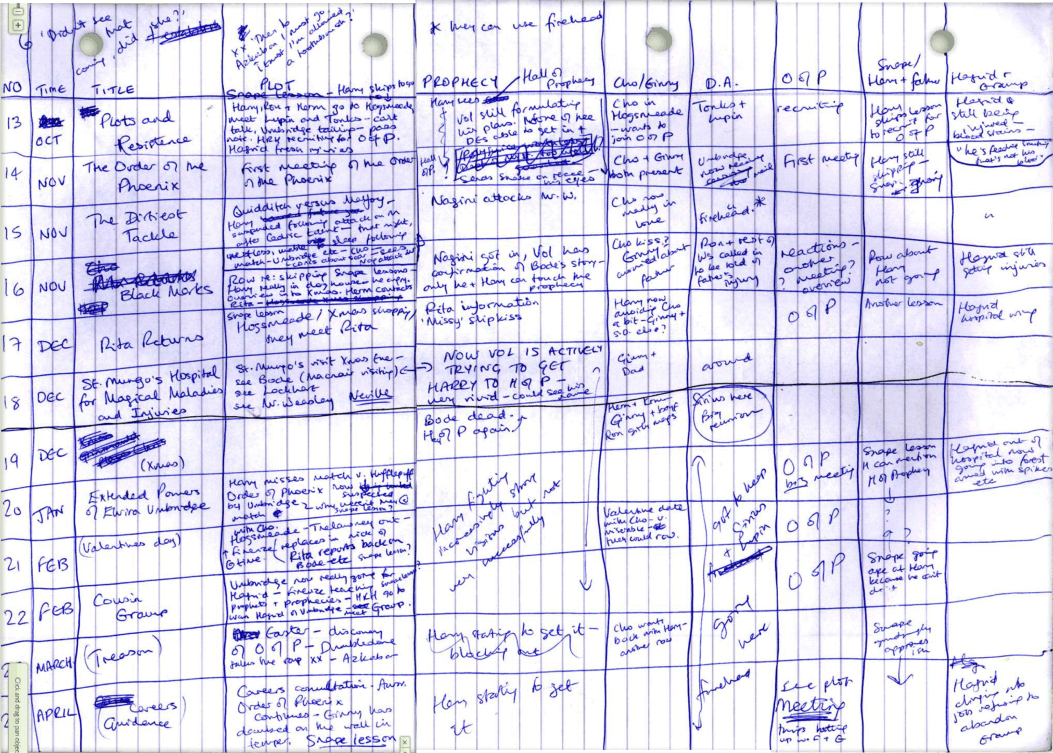
Spreadsheet plotting, believe it or not, is plotting via spreadsheet.
No, seriously, I kid you not.
Before you start cowering in the corner and eating your hair, you should know that it's actually a very simple concept, and don't tune out pantsers because it can work for you too. Spreadsheets can have as little or as much detail as you like. You can start off with a basic outline add to them as you go which makes them ideal for hybrid pantsers. The spreadsheet is a great editing tool, especially with regards to pacing, and fully-fledged pantsers can also benefit just by filling it out as they write. There is no best way to use the spreadsheet, it is simply a tool to make a writer's life easier and more time efficient.
You can create your spreadsheets in Microsoft Excel, Microsoft Word or basically any program that lets you access a table. I use Word because of residual trauma from university finance courses and because you can alter colours or borders (it just doesn't get any better).
Obviously a spreadsheet will change from genre to genre and single titles will require a more complex and detailed spreadsheet structure than category romances. J.K. Rowling's spreadsheets are understandably quite complicated. I would have loved to have posted an image of Rowling's revised plan for the Order of the Phoenix but I am wary of graphics copyright issues so instead I have a partially recreated table for you to get a quick idea (see below) and you can view a copy of Rowling's handwritten original here.


J.K Rowling's approach to spreadsheet plotting is to divide the columns by chapter number, story timeline, chapter title, main plots and subplots. You will find that depending on the length of the book your spreadsheet will quite drastically, for example in category romance, where romance is key and multiple subplots are unnecessary. The following is a list of suggestions for spreadsheet elements:
- chapter number
- chapter title
- time (day/month/year)
- setting
- weather (if relevant)
- point of view
- external conflict (of hero and heroine)
- internal conflict (of hero and heroine)
- main plot summary.
- romance summary: deals only with the romance of the story e.g. hero not committing himself to heroine but being unwilling to let her go/date (this can take care of that wee problem some of us are experiencing in forgetting to strengthen the romantic element of our WIPs)
- pacing/content (see explanation below)
- word count (note: you may wish to include a sum total word count at the bottom)
As you can see a spreadsheet will allow you to keep track of your story with a flick of your eyes to a greater extent than the document map. At a glance you are able to determine what day your hero/heroine was in a particular setting and how they were interacting, so no more extraneous scrolling. There's a lot of elements there and it's really about picking and choosing to design your own.
You can also include a pacing/content column in which you can use symbols or words to keep track of your characters, for example a chapter that emphasizes dialogue may be represented by ("). Similarly, action could be denoted by (!), character thinking by ('), and sex scenes by (*), or whatever symbols/words you wish. These symbols/words can make it easier (especially during editing) to balance the peaks and troughs of your plot and ensure that your readers have rollercoaster of a ride, rather than plodding along with Bob (and very possibly abandoning Bob out of boredom).
If you are working in Microsoft Word a good trick is to vary the line colours, to reduce the strain on your eyes, for example: